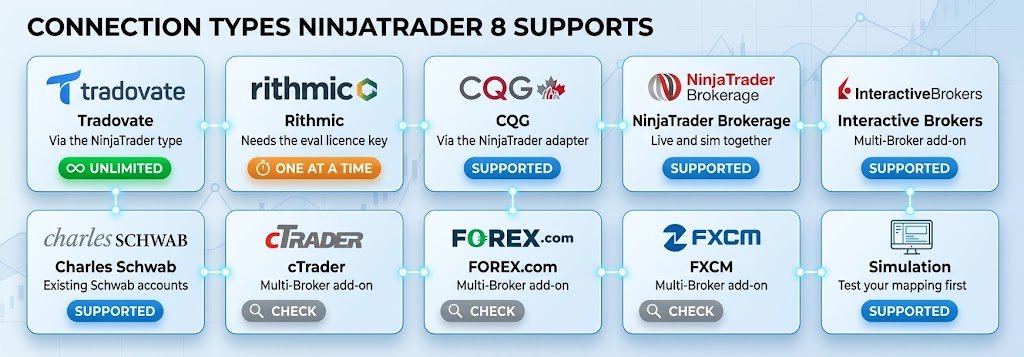
Yes — NinjaTrader 8 can hold accounts from several prop firms connected at the same time, and Quantellics Trade Copier mirrors orders across all of them. The setup takes about ten minutes. The one thing that decides how smoothly it goes is which rail your accounts sit on: Tradovate or Rithmic.
Connecting multiple Tradovate accounts
Tradovate-based prop accounts use the connection type named NinjaTrader in the broker dropdown — not the older entry labelled Tradovate. That newer path uses Tradovate’s direct API integration introduced in NinjaTrader 8.1, and it is what allows unlimited simultaneous logins. If you do not see it, update to the current 8.1.x build first; 8.0 builds cannot connect to Tradovate at all.
| # | Step |
|---|---|
| 1 | In the Control Center, open Tools → Settings and enable Multi-Provider. Restart NinjaTrader. |
| 2 | A Configure button now appears at the bottom of the Connections dropdown. That is where every account gets added. |
| 3 | Add one connection per account, choosing the NinjaTrader connection type and entering that account’s own credentials from the firm’s portal. |
| 4 | Name each one so you can read it at a glance during a session — Apex_50K_Eval_02, Tradeify_150K_Funded. Past about six accounts the naming is the only thing keeping the account list usable. |
| 5 | Connect them all, confirm every account appears in the Accounts tab, then map leader and followers in Trade Copier. |
Which rail is my account on?
The username usually tells you before you try anything. Apex issues Rithmic usernames containing a hyphen, such as Apex-123456, while Tradovate usernames use an underscore. If you are unsure, check the credentials in the firm’s portal rather than guessing — the connection type has to match or the login simply fails.
Connection types NinjaTrader 8 supports
Supported
If NinjaTrader can see the account in its Accounts tab, Trade Copier can route orders to it. There is no separate integration per broker, because the copier works at the NinjaTrader order layer rather than through each broker’s API.
If some of your accounts are Rithmic
Rithmic behaves differently, and this is the one genuine constraint in the platform. Rithmic for NinjaTrader Brokerage allows a single active connection at a time. You can save as many Rithmic connection profiles as you like, but only one can be connected; switching firms means disconnecting the first. Mixing a Rithmic connection with Tradovate connections is fine — that is exactly what Multi-Provider is for. Two Rithmic firms at once is what the platform will not do natively.
| Your mix | What happens |
|---|---|
| All Tradovate, several firms | Everything connects at once. No ceiling, no add-on, no conflicts. This is the setup to aim for. |
| Tradovate plus one Rithmic firm | Works under Multi-Provider. The Rithmic side needs the Evaluation licence entitlement on your NinjaTrader account. |
| Two or more Rithmic firms | Not natively. Move the accounts you can to Tradovate, or run the second firm on a separate machine. |
| Prop accounts plus a personal live account | Fine. A live brokerage login sits alongside prop connections, subject to the single-Rithmic rule. |
Accounts not showing up?
For Rithmic evaluations, the usual cause is a missing Evaluation licence entitlement — check under Help → About in the Control Center. Tradovate evaluation accounts do not need that key at all, so if a Tradovate account is missing, the problem is almost always the credentials or the wrong connection type.
One chart. Every account.
Order-level mirroring inside NinjaTrader 8, with independent sizing per account. Runs locally. One-time licence, no subscription.
Platform behaviour and add-on requirements change between NinjaTrader builds. Confirm the current connection options with NinjaTrader and with your broker before purchasing an add-on or an evaluation, and check your prop firm’s own rules on how many accounts you may trade simultaneously. Quantellics is an independent NinjaTrader Ecosystem vendor and is not affiliated with, endorsed by, or acting on behalf of any broker, platform or firm named on this page. Product names are the trademarks of their respective owners and are used here to describe compatibility only.