NinjaTrader 8 Add-On · Built for Multi-Account Futures Traders
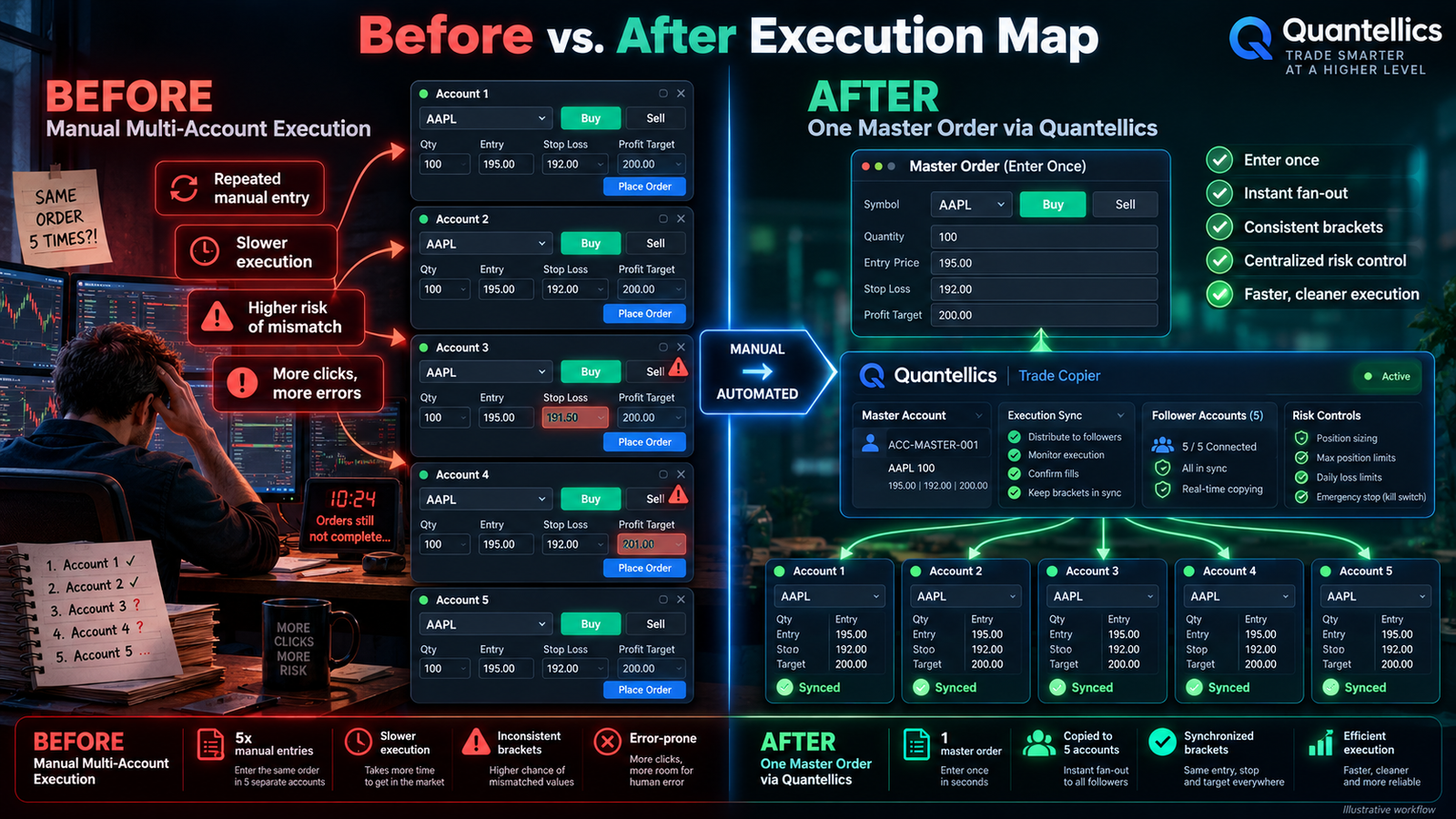
Stop repeating the same entry, stop, target, modification, and cancel across multiple accounts. Quantellics mirrors the order itself from your master account to your selected followers and continuously watches for position drift.
The real multi-account problem
The more accounts you manage, the more chances you create for a missed stop, wrong quantity, late cancel, accidental extra contract, or one account quietly drifting away from the others.
Repeat the same action account by account. Re-check quantities. Re-create brackets. Re-cancel orders. Then verify that every account is still aligned while the market is moving.
Trade the master account the way you normally do. Quantellics mirrors supported order actions to the accounts you choose and monitors positions for mismatches.
Why the mechanism matters
That distinction matters. If a copier waits until your master account fills and then sends a new market order elsewhere, the follower starts later. Quantellics is designed to replicate supported orders when they are placed, then carry modifications, cancels, stops, targets, and position reconciliation through the rest of the trade.
Your limit, market, stop, or bracket begins on the account you actually trade.
Selected follower accounts receive the corresponding supported order action without waiting for you to manually repeat it.
You drag a limit, modify quantity, cancel, scale out, or flatten the master.
The copier propagates supported changes and the sync engine checks for quantity or direction drift.
Proof before purchase
The fastest way to understand a trade copier is to see it submit, modify, protect, and flatten a real multi-account workflow.
Current product walkthrough
What changes when the copier is armed
Supported entries, stops, targets, modifications, and cancels are replicated across selected follower accounts.
LMT 29,551.00 → selected followersPosition-gated exit logic is designed to reduce the risk of leaving an exit order active on an account that never established the intended position.
flat follower → exit deferredThe sync engine compares follower positions with the master and is designed to correct supported mismatch scenarios instead of silently letting drift accumulate.
position mismatch → sync action
The difference in practice
| Workflow | Quantellics approach | Manual / fill-reactive approach |
|---|---|---|
| Entry | Mirror supported order placement | Repeat entries manually or react after the master fills |
| Limit price | Follower limit is submitted at the corresponding requested price | A later market order can create a different execution path |
| Stop + target | Designed to preserve ATM/OCO relationships per account | More manual bracket management |
| Modification | Supported changes propagate from the master | Repeat the edit account by account |
| Position mismatch | Continuous reconciliation logic | Trader must notice and fix it |
| Privacy | Runs locally inside NinjaTrader | Varies by tool |
No software can guarantee identical exchange fills across separate accounts. Queue position, connectivity, broker/routing conditions, and account-specific restrictions can differ.
Under the hood
Features matter only when they solve a failure mode you actually care about.
Market, limit, stop-market, stop-limit, placement, modification, cancellation, and rejection handling.
Designed to keep supported stop/target relationships linked independently on each follower account.
When a follower diverges, the sync logic can detect the mismatch and take corrective action for supported scenarios.
Continuously compares follower positions with the master by instrument.
Choose the master, select followers, watch connection state and positions, and review copier activity.
Runs as a native NinjaTrader add-on. Your connected accounts remain inside your NinjaTrader environment.
Setup
Import the add-on, open it from NinjaTrader Control Center, and select your master account.
Check the connected accounts that should follow. Start with Sim accounts so you can watch the behavior without live-market risk.
Use your existing NinjaTrader workflow. The copier handles the supported replication and synchronization logic in the background.
Trader proof
The questions that matter before you trust a copier
That is exactly why the product includes reconciliation logic. The master remains the reference point and follower mismatches can be detected and corrected in supported scenarios.
Identical fills cannot be guaranteed across accounts. Position-gated exits and sync logic are designed around the reality that one account can behave differently from another.
The copier is designed to propagate the master’s supported flatten/synchronization state so followers do not remain unintentionally exposed.
Good. Start with Sim. The free trial exists so you can deliberately test brackets, cancels, modifications, scale-outs, rejects, and flatten behavior before deciding whether it belongs in your live workflow.
Complete checkout so we can create your customer record and send trial access and product support to your email.
After the trial, current launch price is $125 one-time · regular price $275 · no monthly subscription.
Straight answers
Click any Start Free Trial button, complete checkout with your customer information and email, and apply coupon FREETRIAL. The checkout total should reflect the trial offer before you complete the order. Your email is used for access, trial support, and Quantellics product communications.
No. Start with Sim. Deliberately test entries, stops, targets, order changes, cancels, scale-outs, rejected-order scenarios, and flatten behavior before deciding whether to use the software in a live or funded environment.
Rules vary by firm and can change. Some firms permit copying between accounts under the same trader while restricting signal sharing or cross-user copying. You are responsible for checking the current rules of every firm and account you use.
No. Separate accounts can have different queue positions, connectivity, buying power, risk rules, broker behavior, or exchange outcomes. Quantellics is designed to mirror supported order instructions and reconcile supported position mismatches; it cannot guarantee identical executions.
The copier runs inside NinjaTrader and works with accounts you have already connected there. The product is designed so you do not provide your broker password to Quantellics for normal copier operation.
A rejected follower order can create a mismatch. The sync engine is designed to detect supported mismatch conditions and reconcile follower positions relative to the master.
No monthly subscription for the lifetime license offer shown here. Current launch price after the trial is $125 one-time, regularly $275, including updates as stated in the offer.
Use only the sizing functionality supported by your installed version and test it on Sim first. Account-specific margin, prop-firm limits, and risk controls remain your responsibility.
You don't have to trust it. Test it.
Use the free trial on Sim. Break the workflow on purpose. Move orders. Cancel them. Scale out. Flatten. Then decide if it belongs in your trading setup.