
FOR NINJATRADER AND TRADINGVIEW FUTURES TRADERS

Trading tools and custom development for futures traders.

Copy trades across your NinjaTrader accounts, review every session with the AI Trading Journal, add indicators to your charts, or have your own trading rules built in NinjaScript or Pine Script.

Trading involves risk. Software tools do not guarantee profits.

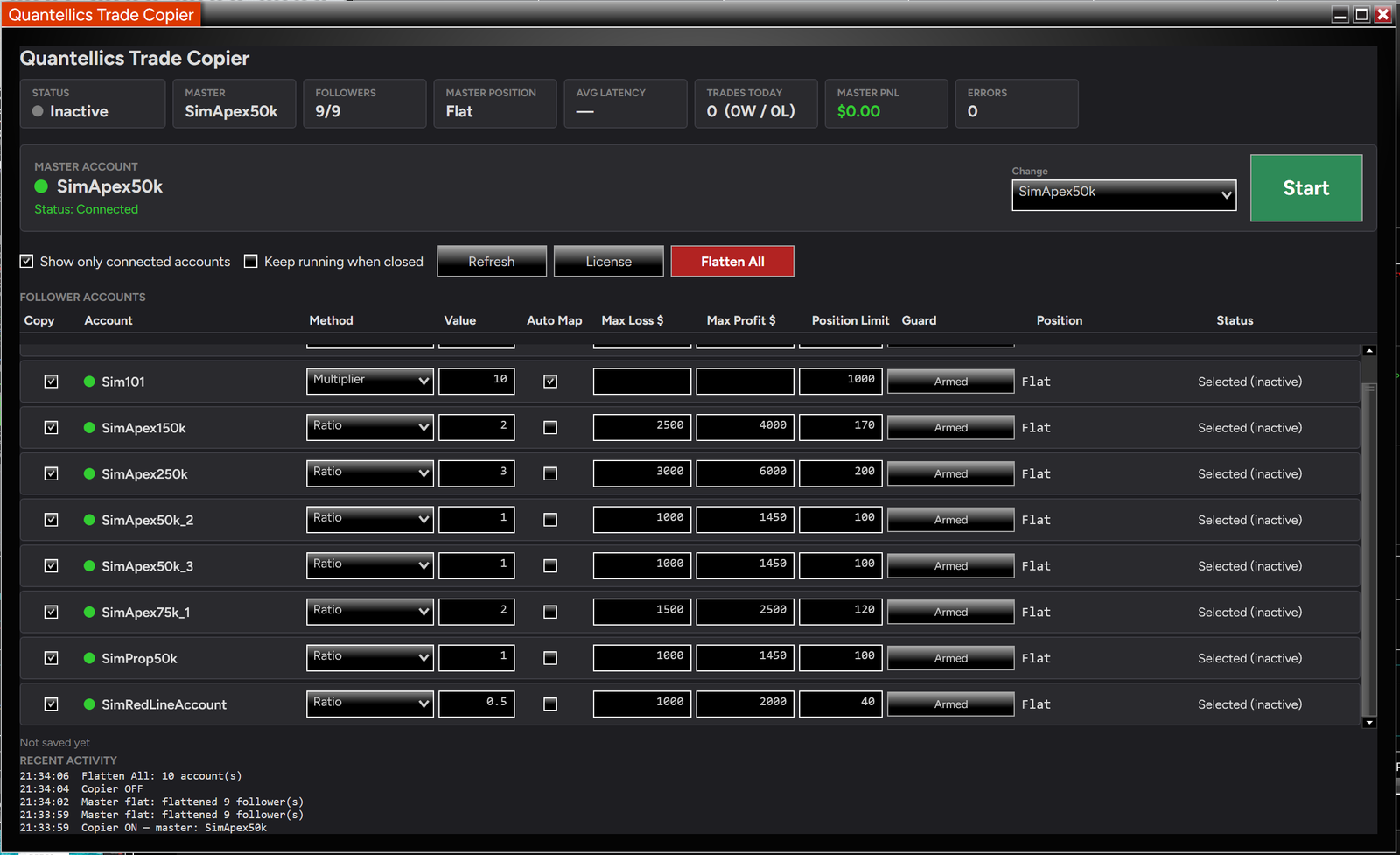
Quantellics Trade Copier interface, shown with multiple child accounts. Click to enlarge.

Four ways Quantellics supports your trading

Trade Copier

Place the order once and copy it from a master account to selected follower accounts in NinjaTrader 8.

  • Works with any connection NinjaTrader 8 supports
  • Copy methods and account status in one dashboard
  • Test with simulation accounts first

$125 one-time (launch price)

AI Trading Journal

Turn completed NinjaTrader executions into a performance dashboard and an AI-powered session review.

  • Automatic trade capture from the NinjaTrader add-in
  • Trade-by-trade AI scoring and explanations
  • Behavior pattern detection and next-session action plans

Add-in free to try; Pro $29/month for AI insights

Indicators

NinjaTrader indicators, including Last Red Line for stop placement within prop-firm risk limits.

  • Last Red Line: maximum stop levels to help avoid account liquidation
  • MACD CrossOver with Keltner Filter
  • Volume Profile Extremes

Priced per indicator, see each product page

Custom Development

Turn your trading idea into a custom indicator, strategy, or add-in for NinjaTrader or TradingView.

  • NinjaScript and Pine Script development
  • Strategy design and backtesting
  • Custom alerts, scanners, and add-ins

Quoted per project

TRADE COPIER SPOTLIGHT

See the copier in action

Watch the product walkthrough, then open the product page for features, licensing, and purchase details.

Video: Quantellics Trade Copier product walkthrough. Examples demonstrate software operation, not expected trading results. Matching fills are not guaranteed.

Trade Copier: start with a simulation setup

1. Install the add-on

Use the installation guide to import the add-on into NinjaTrader 8.

2. Select your accounts

Choose the master account and the follower accounts you want included in the copying setup.

3. Verify in simulation

Place, modify, and cancel test orders. Check the account states before enabling your live configuration.

AI TRADING JOURNAL SPOTLIGHT

Your P&L tells you what happened. Your journal should tell you why.

Automatic capture

The NinjaTrader add-in uploads your entries, exits, quantity, timing, commissions, and realized P&L. No end-of-day spreadsheet work.

Context-aware AI review

Each trade gets a concise score and explanation based on execution quality, timing, risk, market context, and rule adherence.

A plan for the next session

See your strongest setups, costly time windows, and discipline leaks. Every review ends with a short action plan.

CUSTOM INDICATOR & STRATEGY DEVELOPMENT

Your trading rules, built in NinjaScript or Pine Script

Custom indicators, strategies, alerts, and add-ins for NinjaTrader and TradingView, from first idea to a tool you can test on your own charts.

1. Describe

Tell us your platform, market, and the rules your tool should follow.

2. Quote

We review the idea and reply with the scope and a quote for your project.

3. Build

We develop the indicator, strategy, or add-in in NinjaScript or Pine Script.

4. Deliver

You receive the tool to test in simulation before using it with live accounts.

Frequently asked questions

The Trade Copier, AI Trading Journal, and indicators are built for NinjaTrader 8. Custom development is available for NinjaTrader (NinjaScript) and TradingView (Pine Script).

The Quantellics Trade Copier is a NinjaTrader 8 add-on and works with any connection NinjaTrader 8 supports (e.g. Rithmic, CQG, Tradovate, Interactive Brokers). Review its product page for the current requirements before purchasing.

No. Order copying does not guarantee identical fills. Test with simulation accounts first and monitor your account states.

Confirm your firm’s current account-ownership and copying rules before using any copier. Software compatibility does not establish permission under a firm’s rules.

The NinjaTrader add-in is free to try. AI insights and real-time coaching require the AI Trading Journal Pro subscription; see its product page for the current price.

No. The AI Journal reviews completed trading decisions. It does not place, modify, or cancel orders, and it does not guarantee profitable results.

Last Red Line is a NinjaTrader indicator that shows the maximum levels where your stop orders can be placed, to help you stay within prop-firm risk limits and avoid unnecessary account liquidation.

Use the contact page to describe your platform, market, and trading rules. We reply with the scope and a quote before any build starts.

Find the right tool, or have one built for you

Explore the Trade Copier, AI Trading Journal, and indicators, or tell us about the custom tool you need.

Trading involves risk. Software tools do not guarantee profits or identical executions. Test configurations in simulation first.

Ninja Trader

NinjaTrader – Our Recommended Trading Platform
NinjaTrader® is our #1 recommended trading platform preferred by traders worldwide including our clients.

Download NinjaTrader & receive immediate FREE access to:Real-time futures dataUnlimited real-time forex dataAdvanced chartingTrade simulatorStrategy development and backtesting

Connect to Interactive Brokers, TD Ameritrade & more…

NinjaTrader’s award-winning trading software is consistently voted an industry leader by the trading community. Featuring 1000s of Apps & Add-Ons for unlimited customization, NinjaTrader is used by over 100,000 traders for advanced market analysis, professional charting and fast order execution.For new traders, start preparing for the live markets with a free trading simulator featuring real-time market data.

Kinetick Data Feed

Kinetick® delivers reliable, fast and cost-effective market data to help level the playing field for active traders.Take advantage of unfiltered, real time quotes for stocks, futures and forex that exceed the expectations of the world’s most demanding traders, like us! Get started with FREE end-of-day historical market data directly through the NinjaTrader platform and learn how you can significantly reduce CME Group Globex exchange fees on real-time market data with Kinetick.